Free · No account · Nothing uploaded
Compare it.Measure it.Check it.
PartCheck opens STEP files in your browser and answers three questions about a part: what changed since the last revision, how thick the wall is everywhere, and what a toolmaker or CNC machinist would send back. Every answer downloads as a PDF you can pass on.
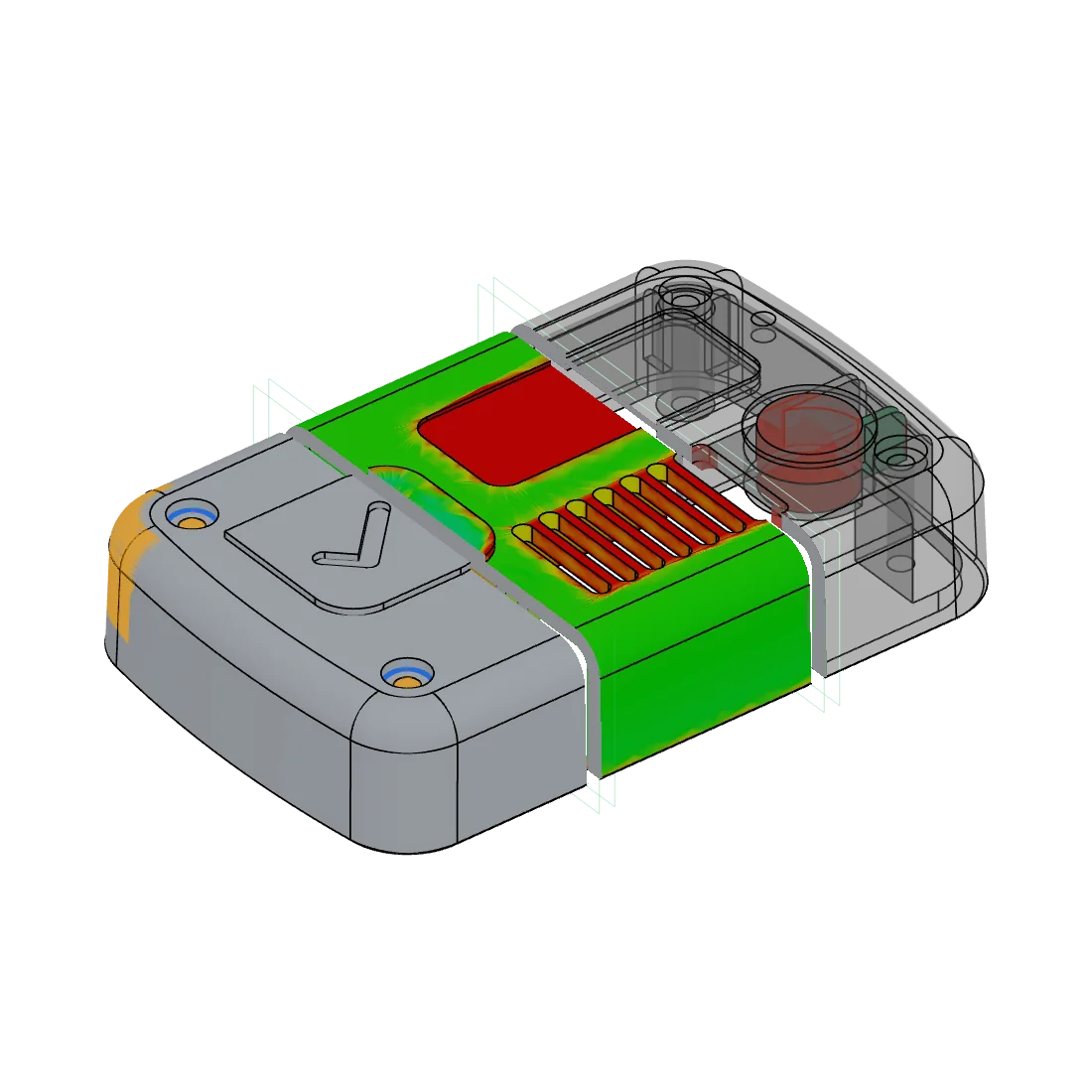
The demo part, cut into three slices: the comparison, the wall-thickness map and the manufacturability checks.
Open your own files
.STEP / .STP
Two STEP files: the old revision, then the new one.
Old revision
.STEP / .STP · one or both
New revision
.STEP / .STP · one or both
Nothing is uploaded. The analysis runs in this tab.
Comparetwo STEP files
Compare two STEP files and see what changed.
Drop in the old revision and the new one. PartCheck measures the surface of one against the other and shows every difference, including the ones nobody meant to make.
- Faces that are the same in both files are set aside first, so meshing noise does not show up as a change.
- Each change is a region with its own area and deviation, and you can hide the ones below a threshold you set.
- Overlay the two, set them side by side, drag a curtain between them, or flick between A and B.
Analyzeone STEP file
Measure the wall thickness, then look at it.
PartCheck takes a reading at every triangle on the surface: the diameter of the largest sphere that fits inside the part and touches the surface where you are standing. Then it paints the result on the part.
Red is thin, blue is thick.
- The five maps here come from two measurements, the wall and the part against its mould axis, so switching between them measures nothing again. The tool has two more: which side a cutter reaches each face from, and the order a mould fills in from gates you place.
- The colour ramp is logarithmic. A part is mostly nominal wall with a long tail into its bosses, and a linear ramp would paint nearly all of it one colour.
- In the tool, hovering re-measures the wall at the point under the pointer, so you read a measurement instead of an averaged colour.
DFMone STEP file and a process
See what a toolmaker would send back.
Pick injection moulding or 3-axis CNC, and PartCheck checks the part against that process’s design-for-manufacturing rules. It tells you which rules the part breaks and where. Switch process and the same part gets a different answer.
Process
Injection moulding in ABS
Running the checks…
- Eleven checks for injection moulding and ten for 3-axis machining. You pick the material, and every limit can be edited.
- On this part the mould objects to the missing draft, and the cutter to slots narrower than its smallest tool. You hear that before the part goes to a supplier.
- It reads geometry alone, with no feature tree or manufacturing intent to go on, and it says so when the geometry is not enough to decide.
Reportsa PDF from any of the three
Send it on as a report.
Download what you found as a PDF, for your manufacturer when a part changes or for your team when you review one. It carries the pictures, the figures and the verdict, so the person reading it does not need PartCheck.
- A comparison report for two revisions, a manufacturability report for the checks, and one for each map: thickness, uniformity, draft, mould halves, tool access, corners and fill.
- Each picture is captured from the view that drew it, on white, next to the figures you saw on screen.
- The PDF is built in your browser like everything else, so nothing is uploaded to make it.
Privacy
Your files are never uploaded.
There is nowhere to upload them. The STEP parser, the diff, the wall measurement and every check run in your browser, on your machine. That is also why there is no account to make and nothing to pay. Apart from an anonymous count of visits, PartCheck sends something only when you write a feedback report and press Send.
Where your files go
See it on a real part.
The demo opens two revisions of a real CAD part in the full tool. Compare them, map the wall, run the checks and download the reports, without a file of your own.